
You do the work. Win! Payment makes sure you get paid.
Collect faster. Stop chasing. Keep what you've earned.
Win! connects your Xero, QuickBooks Online, or GoHighLevel account to your own Stripe account and automates everything between "invoice created" and "cash received." Payment links, autopay, reminders, and real-time Xero/QBO reconciliation — running quietly in the background, on your behalf.
- Autopay — invoices charge themselves
- Reminders that stop the moment you're paid
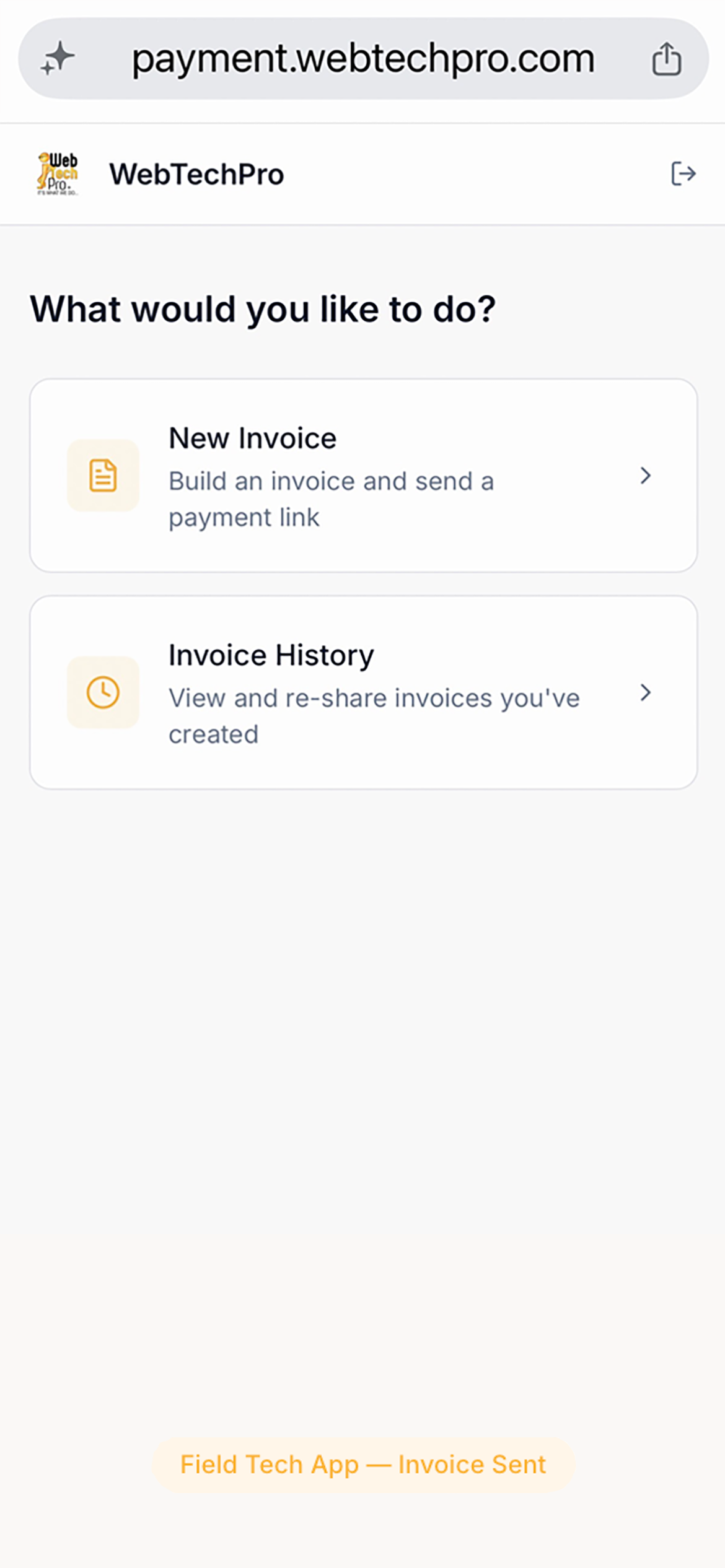
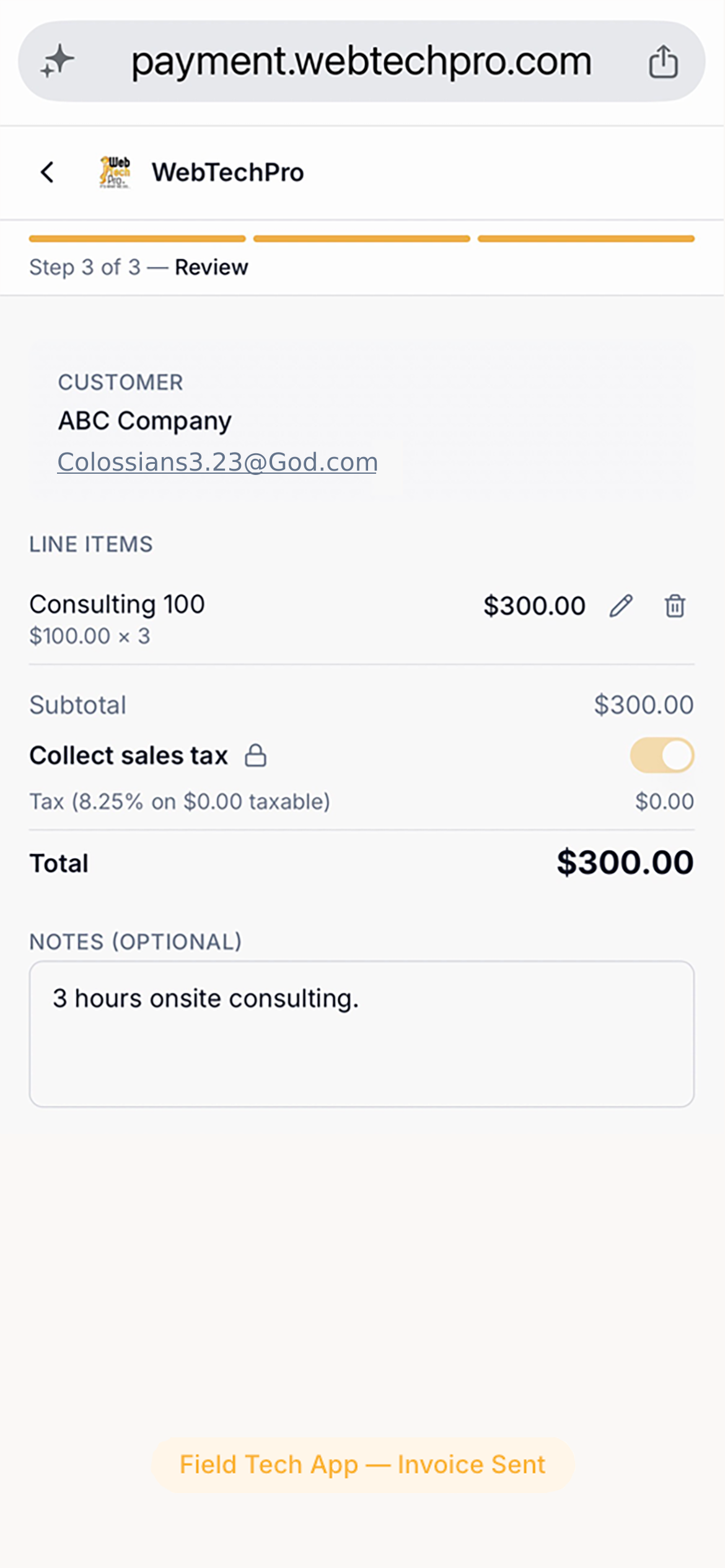
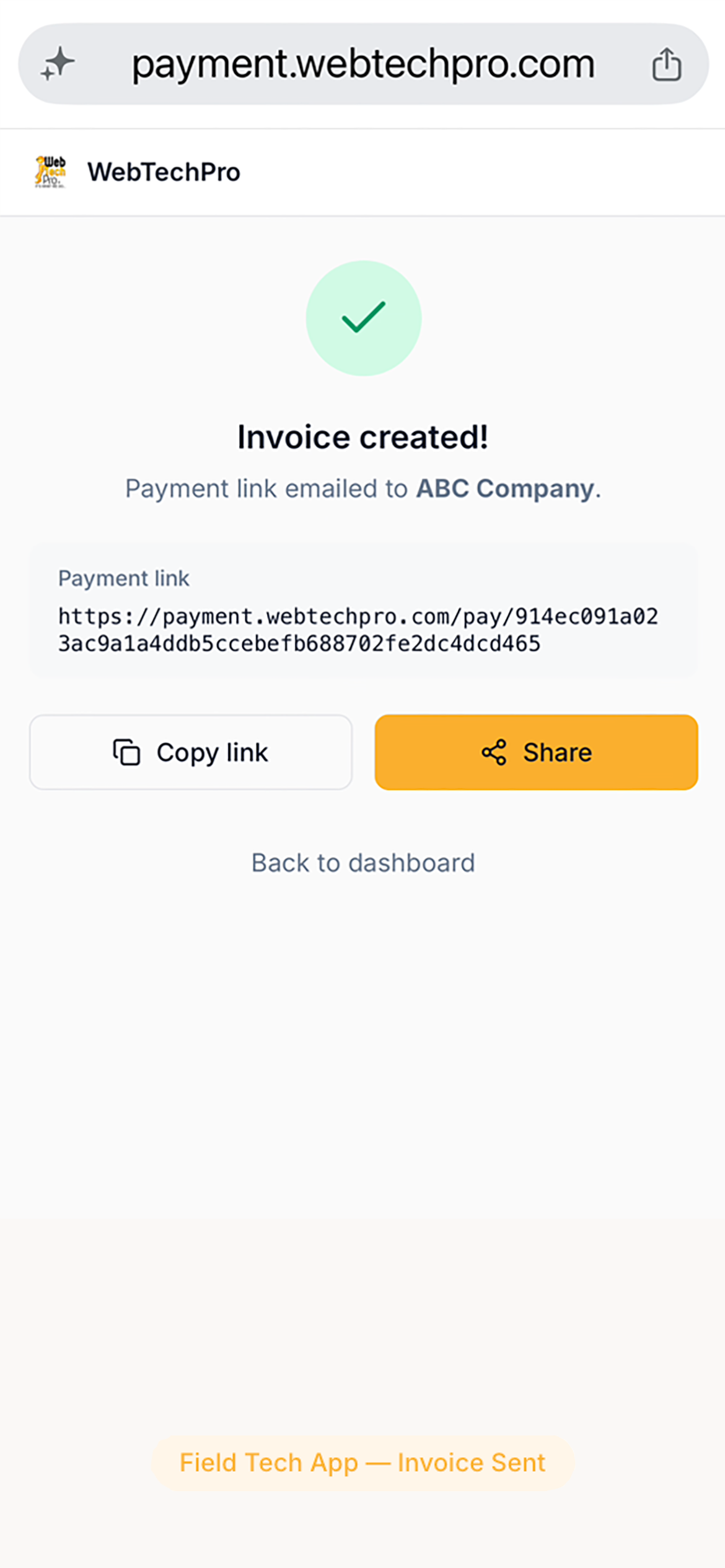
- Field Tech App — invoice on-site, collect on-site
- Pass the card fee, compliance handled automatically
- Books update in seconds — not at month-end
- 30-day free trial — no credit card required
Invoice #INV-0047
$3,840.00
Win! Payment · Invoices
Outstanding AR
Acme HVAC Services
INV-0047
$3,840
14d overdueSummit Plumbing
INV-0051
$2,100
3d overdueMetro Electrical
INV-0049
$1,260
7d overduePeak Refrigeration
INV-0053
$890
Due todayWin! Payment · Reports
Revenue
$47,320
$47.3k
Collected
$8.1k
Outstanding
68%
Autopay %
Top client · Jul
Acme HVAC Services
$10,500
Win! Payment · Intelligence
Client Intelligence
Acme HVAC Services
Low riskAvg pay time
8 days
On-time rate
▲ 94%
Metro Electrical Co.
MonitorAvg pay time
23 days
On-time rate
▼ 71%
Summit Plumbing
Low riskAvg pay time
12 days
On-time rate
▲ 87%
Peak Refrigeration
At riskAvg pay time
31 days
On-time rate
▼ 58%
Portfolio avg DSO
18.5 days
vs industry avg
▲ 11.5d better
Built on the tools you already trust
The gap between invoice and payment
You invoice in Xero, QuickBooks, or GoHighLevel.
Win! is what happens next.
Xero, QuickBooks Online, and GoHighLevel are excellent at creating invoices. None of them are built to collect those invoices automatically. Win! Payment fills that gap — sitting between your platform and your customers, automating the full payment lifecycle without changing how you work.
Xero users
Any active Xero organisation
- Win! reads approved invoices from your Xero organisation — nothing to export, nothing to re-key
- Every payment marks the invoice paid in Xero and records the received payment automatically
- Contacts, amounts, due dates, and line items stay in sync in real time
- No conflict with Xero's other features — Win! adds collection, not complexity
- Multi-organisation support — connect more than one Xero account under a single Win! subscription
QuickBooks Online users
Any active QBO subscription
- Win! reads outstanding invoices directly from your QuickBooks Online company — no CSV, no copy-paste
- Every payment is written back to QuickBooks as a received payment, keeping your books balanced automatically
- Customer records, invoice totals, and due dates stay in sync as you update them in QBO
- ACH at 0.8% capped at $5 — half the cost of QBO Payments' 1% capped at $10
- Surcharging built in — pass card fees to customers compliantly, a feature QBO Payments doesn't offer
GoHighLevel users
Any active GHL account
- Win! imports outstanding invoices from your GoHighLevel account — contacts and amounts synced automatically
- Every payment collected through Win! is reported back to GoHighLevel, keeping your pipeline current
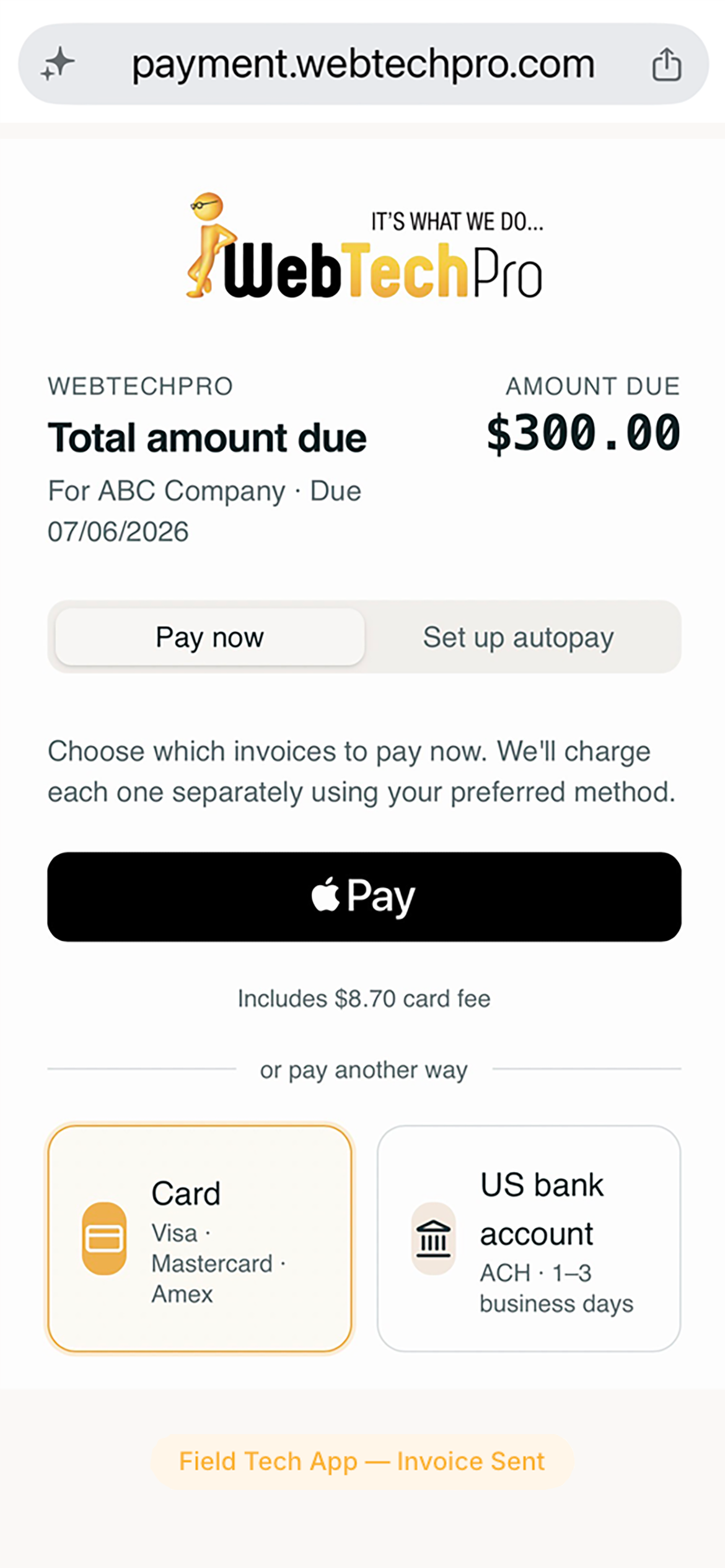
- Customers pay by card, ACH, Apple Pay, or Google Pay — no GHL-native payment account required
- AutoPay enrollment lets recurring GHL clients pay every future invoice without any action on their part
- Automated reminder sequences follow up on unpaid invoices so your team doesn't have to
Your accounting workflow doesn't change. Getting paid does.
Keep creating invoices in Xero, QuickBooks, or GoHighLevel exactly as you do today. Win! monitors your account, sends payment links, charges autopay clients, and follows up on overdue balances. Payments reconcile back automatically, on whichever platform the invoice came from. You don't change anything. Your cash flow changes dramatically.
Who Win! is for
If you invoice customers and wait to get paid, Win! is for you.
The gap between "invoice sent" and "payment received" shows up in every industry. Win! closes it — for HVAC, IT, trades, professional services, and any other business that invoices through Xero, QuickBooks Online, or GoHighLevel. The list below is a sample, not a limit.
Win! was built because getting paid shouldn't be a second job. You do the work. The money should arrive.
Up and running in 15 minutes.
Three connections. No code. No configuration. No learning curve.
Connect Xero, QuickBooks, or GoHighLevel
Authorise Win! to read invoices, contacts, and your product catalogue. Win! reads what it needs — nothing else. Takes about 3 minutes.
Connect Stripe
Link your existing Stripe account or create a new one free. Every payment goes directly to your Stripe balance — never through Win!. Your account, your payouts, always.
Start collecting
Send your first payment link from any invoice in one click. Enrol clients in autopay. Turn on automated reminders. Win! handles everything from there.
How Win! works — feature by feature
Revenue automation — from invoice to cash.
Win! is a single connected system. Every feature contributes to one outcome: getting paid without manual work.
Autopay — invoices charge themselves
Your customer saves a payment method once. Every invoice you create after that charges automatically. No follow-up. No awkward calls. No waiting. When a client is on autopay, their balance clears the moment you raise the invoice in your invoicing platform.
- Send an autopay enrollment link in one click — client saves a card or ACH bank account on a Stripe-hosted page
- Every invoice you create in your invoicing platform triggers an automatic charge — no manual action, ever
- Works for any invoice amount — maintenance contracts, project invoices, or one-off work
- Customer receives a branded receipt from your business, not from Win! or Stripe
- Payment posts to the matching invoice in your invoicing platform within seconds of the charge
- Client can update their payment method anytime through their self-serve portal
Invoice on the job. Get paid before you leave.
Your technician finishes the work. Before they leave, they've built an invoice in your invoicing platform, texted a payment link to the customer, and in most cases received payment — all from their phone, without calling the office. No paper. No 30-day wait. No chasing.
Learn more about the Field Tech App- No app to download — works instantly in any smartphone browser, iOS or Android
- Technician picks the client from your invoicing platform's contacts and selects from your product catalogue — done in under 60 seconds
- Invoice is created instantly in your invoicing platform as an authorised invoice
- Tap Share — payment link arrives by SMS or email while the tech is still on-site
- Technicians see only their own invoices and your product catalogue — no access to your financials
- Every field invoice reconciles into your books automatically the moment payment lands
Reminders that go out — and stop — automatically
Nobody enjoys chasing payments. Win! does it on your behalf — politely, on schedule, under your business name. Every reminder carries a direct Pay Now link. The moment an invoice is paid, all pending reminders cancel. Your customers never receive a chaser after they've already paid.
- Configurable schedule: before due, on the due date, then overdue escalations
- Every reminder is branded with your company name and logo — customers see your business, not Win!
- Each email includes a one-click Pay Now link — no customer login required
- Reminders stop automatically the moment the invoice is paid
- Autopay clients are never sent reminders — only manual-pay clients receive follow-ups
Pass the card fee — transparently and compliantly
Stripe processing costs you 2–3% on every card payment. Win! lets you add a transparent service fee at checkout so your customers carry that cost instead of you. Every layer of compliance is handled automatically — if your state restricts surcharging, the fee is blocked before your customer ever sees it.
- One toggle in your settings — no code, no configuration, no manual state tracking
- Win! confirms your business state first — a 30-second step that unlocks the full compliance engine
- The engine knows which US states permit credit card surcharging and which restrict it — rules enforced in real time
- If your state doesn't allow it, the fee is blocked — you cannot charge it by mistake
- Customers see the full breakdown before they pay: invoice amount, service fee, and total due
- Debit cards are automatically detected and exempt — any mistaken surcharge refunded within minutes per Visa and Mastercard rules
Payment lands. Books update. Nothing left to do.
The moment a customer pays — by card, ACH, Apple Pay, or autopay — Win! marks the invoice paid in your invoicing platform. Partial payments update the outstanding balance. Refunds are reflected. Your accounting is accurate without you touching it.
- Invoice marked paid in your invoicing platform within seconds of every successful charge
- Partial payments update the remaining balance — no duplicate entries, no manual adjustments
- Refunds and failed payments write back to your books automatically
- No CSV exports, no copy-paste, no manual reconciliation at month-end
- Month-end close becomes a review — not a project
Your domain. Your brand. Zero mention of Win! or Stripe.
When customers click a payment link, they land on pay.yourcompany.com — not on a Win! URL. The address bar shows your domain. The checkout page shows your logo and primary color. The sign-in screen shows your brand and your message. To your customers, it's entirely your payment system.
- Point your own subdomain at Win! — one DNS record, set up in minutes
- Every payment page, customer portal, and sign-in screen serves from your domain
- Automatic HTTPS — a TLS certificate is provisioned and renewed for you automatically via Cloudflare
- Customize the sign-in page message to match your brand voice — or leave it blank for a clean default
- Your brand color fills the sign-in page panel; your square logo replaces the Win! mark
- Zero mention of Win! or Stripe in any customer-visible URL or page element
Built for your brand
Your domain. Your colors. Your logo.
And a Field Tech App your team will actually use.
Win! runs under your brand at every customer touchpoint — and gives your technicians a no-download payment tool they can use from any job site.
Custom URL
Customers land on pay.acmeplumbing.com — not a Win! or Stripe address. One DNS record, HTTPS provisioned automatically.
Brand color & logo
Your color fills every header and button. Your square logo replaces the Win! mark on every payment page and email.
Field Tech payment collection
Technician sends a payment link on-site. Customer pays by card, ACH, or Apple Pay — no login, no app download needed.
Invoice #1042
Johnson Property Services
Amount due
$1,240.00
PCI-DSS L1 · 256-bit SSL · Stripe Verified
Everything included. Nothing extra.
One flat subscription covers every feature below — no add-ons, no per-feature charges, no revenue share.
Autopay
A client saves their payment method once. Every invoice you create after that charges automatically — variable amounts, project work, recurring billing. No follow-up required, ever.
Automated reminders
Scheduled, branded follow-ups before, on, and after the due date — with a direct Pay Now link in every email. They stop the moment the invoice is paid.
One-click payment links
Send a branded payment page by email or SMS in seconds. Card, ACH, Apple Pay, Google Pay. No customer login. Most pay within the hour.
Surcharge compliance engine
Enable it once. Win! knows which US states permit credit card surcharges — and enforces those rules in real time. You cannot charge a fee where it isn't permitted.
Real-time reconciliation
Every payment posts to the matching invoice in your invoicing platform within seconds. Partial payments, refunds, and failures all write back. No manual entries, ever.
Self-serve customer portal
Customers view invoices, download receipts, and update their saved payment method without calling you. Less admin for them. Less admin for you.
Your money. Your relationship.
Stripe Connect direct charges — funds land in your own Stripe balance from dollar one. Win! is a subscription. Your Stripe account is yours. Disconnect anytime.
Mobile-first checkout
Payment pages that work on any phone, tablet, or desktop. Apple Pay and Google Pay in one tap. No app to install, no account for your customer to create.
Your brand on every touchpoint
Your name, logo, and colors on every payment page, reminder email, and receipt. Customers see your business — not Win!, not Stripe.
Custom payment domain
Point pay.yourcompany.com at Win! with one DNS record. Every checkout page, customer portal, and sign-in screen serves from your domain — full HTTPS, zero Win! or Stripe branding in the address bar.
Outstanding AR dashboard
Every open invoice across every customer — amount, age, overdue status, and last reminder sent. Know exactly what's outstanding across Xero, QuickBooks, and GoHighLevel in one place.
Field Tech App
Technicians build invoices from any smartphone browser — no download. Pick the client from your Xero, QBO, or GoHighLevel contacts, add line items from your product catalogue, tap Send. The customer gets a payment link. The invoice is in your books.
Learn moreHow Win! compares.
Most tools solve one piece — payments, or reminders, or reconciliation. Win! automates the entire cycle — invoice to cash — using your existing accounting software and your own Stripe account. No middleman. No lock-in.
| Feature | Win! | ConnectBooster | GoCardless | Jobber | QBO Payments |
|---|---|---|---|---|---|
Funds go directly to your bank Payments hit your Stripe balance — no middleman holds your cash or remits on a delay | |||||
Xero, QuickBooks Online & GoHighLevel Sync with your accounting platform or CRM — use one or more simultaneously | Xero only | QBO only | |||
ACH bank transfer rate | 0.8%, max $5 | Varies | 0.5 – 1% | 1% | 1%, max $10 |
Automated payment reminders Scheduled follow-up emails until the invoice is paid — no manual chasing | |||||
Client autopay enrollment Customers save a card or bank account for hands-free recurring collection | |||||
Credit card surcharge compliance State-by-state enforcement engine — auto-refunds debit surcharges per Visa/MC rules | |||||
Fully branded payment pages Your logo and brand color on every checkout page, email, and payment receipt | |||||
Custom payment domain pay.yourcompany.com on every checkout, portal & sign-in screen — full HTTPS, no Win!/Stripe in the URL | |||||
Field Tech mobile app Technicians create invoices and collect payment on-site — no office needed | |||||
No platform fee on top of Stripe Win! charges a flat subscription — Stripe's standard rates are the only processing cost |
One flat price. No surprises.
A flat monthly subscription covers everything. Stripe's standard rates are the only processing cost — Win! adds no platform percentage, no per-invoice charge, no revenue share. The only difference between plans is invoice volume.
Everything included in both plans
- Your logo & primary color on every payment page, email & receipt
- Custom payment domain — pay.yourcompany.com, full HTTPS, zero Win! branding in the URL
- Field Tech App — create and send invoices from any job site
- Hosted payment links — send in one click from any invoice
- Credit card payments (Visa, Mastercard, Amex, Discover)
- ACH / bank account payments
- Apple Pay & Google Pay
- Autopay — customers save once, invoices charge themselves automatically
- Automated payment reminders (before, on & after due date)
- Instant reconciliation into Xero & QuickBooks Online
- Self-serve customer portal (invoices, receipts, saved payment methods)
- Client Intelligence — payment behaviour analytics per client
- Outstanding AR dashboard
- Multi-currency (USD, CAD, GBP, AUD, EUR)
- 30-day free trial — no credit card required
Already using QuickBooks Payments? Win! can pay for itself.
Win! Payment collects via Stripe, which costs less than QBO Payments on every transaction type. ACH bank transfers: 0.8%, max $5 through Stripe vs 1%, max $10 through QBO Payments. That's up to $5 saved per ACH payment. On 20 ACH invoices a month, the processing savings alone can cover the Starter plan.
US pricing shown. Stripe processing fees are billed separately by Stripe — not by Win! · Security & compliance
Frequently asked questions
What is Win!, exactly?+
Who is Win! for?+
Do I need Xero, QuickBooks Online, or GoHighLevel — and Stripe?+
Is there a free trial?+
Does my branding appear on payment pages and emails?+
What do my customers see when they pay?+
Is Stripe cheaper than QuickBooks Payments?+
Yes — especially on ACH bank transfers, where the savings are significant on large invoices.
| Stripe via Win! | QBO Payments | |
|---|---|---|
| Card payment | 2.9% + $0.30 | 2.99% + $0.25 |
| ACH bank transfer | 0.8%, max $5 | 1%, max $10 |
On any ACH payment over $500, Win! customers pay $5 — half the $10 cap charged by QBO Payments. For many businesses, the ACH processing savings alone cover Win!'s monthly subscription fee.
Are there hidden fees?+
See all questions on the support & FAQ page →